TL;DR: I used GitHub Copilot to build a personal Android app, then Dependabot broke CI with cascading dependency upgrades. Instead of fixing them manually, I set up a GitHub Agentic Workflow that automatically analyzes CI failures, determines if they’re transient or permanent, and creates fix PRs — all without human intervention. The workflow itself was also written by an AI agent from a single prompt.
AI agents are ushering in a new era of software development — one where it’s suddenly economical to build highly tailored applications for a tiny audience. Apps that serve a niche of ten people, five people, or even just one person are now viable. The traditional calculus of software development — where the cost of building something had to be justified by the number of users it would serve — is being fundamentally rewritten. With AI-powered coding assistants, the marginal cost of creating a bespoke application has dropped so dramatically that the “audience of one” app is no longer an indulgence; it’s a practical reality.
This post is about exactly one of those apps: an all-Kotlin Android application that does a very specific thing that only benefits me. I have no mobile development experience, and frankly, I have no desire to acquire it. The traditional path — learning Android development, understanding the SDK, wrestling with Gradle, and so on — would take a significant time investment with a steep opportunity cost, all for an app with a single user. It simply wouldn’t be economically rational. Instead, I used GitHub Copilot CLI to build it: I started with an initial prompt describing what I wanted, then iterated with a handful of refinements for minor adjustments (some of the improvements were done using GitHub mobile app while doing daily walks while assigning tasks to Copilot coding agent). The end result is a fully functional Android app that fits my needs 100%, complete with a CI workflow that builds and releases it so I can sideload it on my phone without any effort.
The app was up and running, doing exactly what I needed. Life was good. Then all the “problems” started, when I enabled Dependabot version updates to keep the dependencies up to date automatically. A perfectly reasonable thing to do — you want your dependencies current, especially on a platform like Android where the ecosystem moves fast. Dependabot dutifully went to work and created a bunch of PRs to update various dependencies.
And then most of the CI checks failed on the created pull requests.
The failures were varied but all rhymed with the same theme: dependency upgrades in the Android/Kotlin ecosystem are rarely isolated events. Some new versions required pulling in additional dependencies. Others bumped their minimum Android API level, which clashed with my target — I had foolishly aimed very low by setting a minimum of Android 8, thinking broader compatibility was a virtue (even though I’m on the latest Android version). Some were compiled against a newer Kotlin version than the one configured in the project. And several required a more recent version of Gradle, which in turn sometimes required updating the Android Gradle Plugin, which in turn… you get the idea. It’s turtles all the way down.
Now, I didn’t want to spend time on this. The whole point of using AI to build this app was to not invest significant time in Android development. Manually triaging and fixing each Dependabot PR would defeat the purpose entirely. So I had a few choices:
- Don’t update the dependencies. Just ignore Dependabot entirely. The app works, and as a personal app with an audience of one, who cares about dependency freshness? A valid choice, but it felt like giving up — and stale dependencies have a way of compounding into bigger problems down the road.
- Assign the fixes to Copilot coding agent. Let Copilot’s coding agent take a crack at each failing PR. This would work, but it’s still somewhat manual — I’d have to assign each one and babysit the results.
- Open up Copilot locally and prompt it until it was fixed. Sit down, open the editor, and iterate with Copilot on each failure until it was resolved. Effective, but again, manual effort per PR.
- Build an agentic workflow that automatically fixes any CI failure for me without any manual intervention. Set up an automation so that when Dependabot opens a PR and CI fails, an agent kicks in, analyzes the failure, pushes a fix, and keeps going until CI passes — all without me lifting a finger.
I chose option 4. Obviously (for someone who didn’t want to spend time on it…..), this was probably a little more work upfront, but it was also a fun opportunity to sharpen the saw, hone my GitHub Agentic Workflows skills and see how far I could push the automation. The idea of setting up a system that could autonomously triage and fix CI failures was too enticing to pass up.
What are GitHub Agentic Workflows?
Info
GitHub Agentic Workflows are currently in technical preview
GitHub Agentic Workflows is a framework, developed by GitHub Next and Microsoft Research, that lets you define repository automation using markdown files. You write a .md file with a YAML frontmatter (triggers, permissions, safe outputs) and a natural-language body (the instructions for the agent), commit it alongside a compiled .lock.yml, and GitHub Actions takes care of the rest. Under the hood, it runs coding agents — Copilot CLI, Claude, Codex — inside Actions runners, triggered by repository events (PRs, workflow completions, issues) or on a schedule.
The key design constraint is the safe outputs model: the agent runs with read-only permissions by default and can only perform write operations (creating PRs, commenting on issues, pushing commits) through explicitly declared safe outputs in the frontmatter. This means the workflow definition itself acts as a security boundary — you declare upfront what the agent is allowed to do, and the compiled lock file enforces it at runtime. GitHub Next calls this approach Continuous AI: augmenting deterministic CI/CD pipelines with AI agents that can reason about failures, triage issues, and take corrective action — all within a sandboxed, auditable environment.
Having Copilot create the agentic workflow
The official documentation on creating workflows does a great job explaining how to set up agentic workflows from scratch. For broader context, Colin Dembovsky’s Transform your SDLC with Agentic Workflows and Ken Muse’s GitHub Agentic Workflows Bring AI Agents to Actions are both excellent introductions worth reading.
This is the process I took (but other workflows are also possible):
flowchart LR
    A["Write detailed prompt
describing desired
agentic workflow"] --> B["Assign task to
Copilot coding agent"]
    B --> C["Coding agent
creates PR with
workflow definition"]
    C --> D["Review & merge the PR"]
    D --> E["Wait for next
CI failure"]
    E --> F["Agentic workflow
triggers & fixes
it automatically"]
Rather than installing the gh aw CLI and setting up a local environment, I took a shortcut: I assigned the task of creating the agentic workflow using Copilot’s coding agent.
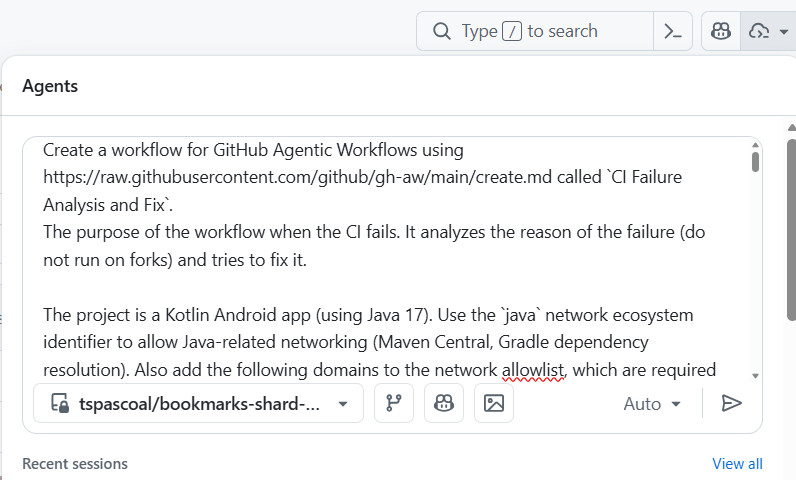
This is the prompt I’ve used (I worked a bit on it so the agent could implement the workflow in (hopefully) a single shot):
Full prompt used to create the agentic workflow
Create a workflow for GitHub Agentic Workflows using https://raw.githubusercontent.com/github/gh-aw/main/create.md called `CI Failure Analysis and Fix`.
The purpose of the workflow is to run when CI fails. It analyzes the reason for the failure (do not run on forks) and tries to fix it.

The project is a Kotlin Android app (using Java 17). Use the `java` network ecosystem identifier to allow Java-related networking (Maven Central, Gradle dependency resolution) and the `github` ecosystem as well, since many Java resources are hosted on GitHub.

This project uses Gradle and the Gradle wrapper included in the repository to build. Always inspect the `CI Build` workflow to understand the exact build invocation. Create setup steps for Java 17 and ensure the Gradle wrapper is executable (`chmod +x gradlew`), so the code compiles in the agent environment. Use `./gradlew` exclusively — do not install Gradle globally.

If it is NOT a transient failure and you can fix it, then make the necessary fixes, before pushing the fix ensure the code builds successfully. THAT IS A KEY CONDITION

The CI workflow is called `CI Build` and the agentic workflow should be triggered only when the `CI Build` workflow fails on any branch. Do NOT run on fork repositories — use the gh-aw compiler's built-in fork protection for `workflow_run` triggers (fork check is injected automatically; also add a `branches` filter to prevent strict-mode warnings).

If the failure is transient (e.g., network timeout, infrastructure outage, rate limiting by a package registry, or a flaky test with no relevant code changes):
- If triggered by a pull request: add a comment to the PR stating the failure appears transient and no code fix is needed. Use `hide-older-comments: true` on the `add-comment` safe output to avoid comment spam on repeated transient failures.
- If triggered on the main branch or any other non-PR branch: call `noop` — do NOT create issues or comments for transient failures that are not associated with a pull request.

If you cannot determine whether a failure is transient or permanent, treat it as permanent and proceed with diagnosis.

For non-transient failures:

Where to apply the fix:

Always create a new pull request with the fix, using a branch named `fix/ci-failure-<short-description>` (e.g., `fix/ci-failure-kotlin-api-deprecation`). The PR title should be prefixed with `[automated-fix]` and include labels `automated` and `ci-fix`. Use `github-token-for-extra-empty-commit: app` in the `create-pull-request` safe output so that CI is triggered on the new PR.

When creating pull requests there are no protected files. You can modify any file in the repository, don't use the fall-back-to-issue option in the `create-pull-request` safe output and make sure `protected-files` are set to allowed.

If you are not able to create a successful fix (other than transient failures):
- If it happened on a pull request, then add a comment to the pull request with the analysis of the failure and the next steps to be taken by the developers.
- If it happened on the main branch, then create an issue with the analysis of the failure and the next steps to be taken by the developers. The issue must be worded so it can be actioned by GitHub Copilot coding agent: include the root cause, suggested approaches, and clear success criteria for the fix.

In all cases where no code change is made and no comment/issue/PR is created, you MUST call the `noop` tool with a brief explanation of why no action was taken. Failing to call any safe output (including `noop`) will cause the workflow to fail with a runtime error.

If the CI has been triggered by Dependabot then treat it as a normal CI failure. The agentic workflow must be triggered for Dependabot runs. Dependabot is not a repository member, so its permission level is `none`, which is rejected by the default `on.roles: [admin, maintainer, write]` check. To fix this, set `on.roles: all` so that any actor (regardless of repository permission level) can trigger the workflow. Also explicitly allow the `dependabot[bot]` actor via `on.bots: [dependabot[bot]]`.

Use the GitHub App **only for safe outputs** (write operations). The `APP_ID` repository variable and `APP_PRIVATE_KEY` secret are already configured. Reference: https://github.github.com/gh-aw/reference/auth/#using-a-github-app-for-authentication

You are allowed:
- Upgrade Gradle (update the wrapper using `./gradlew wrapper --gradle-version <new-version>` and commit the updated wrapper scripts and checksums)
- Update other dependencies
- Update deprecated methods
- Fix breaking changes
- Remove unnecessary code

You are NOT allowed to:
- Change the project's minimum Android SDK version (`minSdkVersion`) to a value above API 35
- Skip or delete failing tests
- Disable lint checks or static analysis

If you make relevant changes to the codebase make sure the README, copilot-instructions.md and CI workflow files are updated accordingly.

Create the pull request to include the newly created agent
In short, the prompt instructs the agent to: monitor the CI Build workflow for failures, distinguish transient issues (network timeouts, registry rate limits) from permanent ones (compilation errors, dependency conflicts), and act accordingly — either creating a fix PR with a verified build, commenting on the PR with a root-cause analysis, or filing an actionable issue. It also handles Dependabot-triggered runs and enforces guardrails like not bumping the minimum SDK or disabling lint checks.
When the Copilot coding agent finished, I got a PR with three files, let’s focus on the important ones:
.github/workflows/ci-failure-analysis-and-fix.md— the workflow markdown file. This is the file we actually care about. It contains the frontmatter (the YAML header that configures triggers, permissions, safe outputs, and tools) followed by the natural-language instructions that tell the coding agent what to do at runtime — in our case, how to analyze CI failures, distinguish transient from non-transient issues, and decide whether to open a fix PR, leave a comment, or call noop..github/workflows/ci-failure-analysis-and-fix.lock.yml— the workflow lock file. This is the compiled output produced bygh aw compile: a fully hardened GitHub Actions workflow in YAML format that GitHub Actions actually executes. The compilation step validates the frontmatter, resolves imports, applies security hardening, and generates the final.lock.yml. At runtime, GitHub Actions runs the lock file, which in turn loads the markdown file’s instructions for the coding agent to follow. Both files must be committed to version control — the.mdis what you author and review, the.lock.ymlis what Actions runs.
This is our agentic workflow definition handed to us by Copilot coding agent:
Full agentic workflow definition (ci-failure-analysis-and-fix.md)
---
name: CI Failure Analysis and Fix
description: Analyzes CI Build workflow failures, determines if they are transient or permanent, and attempts to create fixes for non-transient failures.

on:
  workflow_run:
    workflows: ["CI Build"]
    types: [completed]
    branches: ["**"]
  roles: all
  bots: ["dependabot[bot]"]

if: ${{ github.event.workflow_run.conclusion == 'failure' }}

permissions:
  contents: read
  pull-requests: read
  issues: read
  actions: read

checkout:
  ref: ${{ github.event.workflow_run.head_sha }}

steps:
  - name: Set up JDK 17
    uses: actions/setup-java@v4
    with:
      java-version: "17"
      distribution: "temurin"
  - name: Make Gradle wrapper executable
    run: chmod +x gradlew

tools:
  github:
    toolsets: [default, actions]

network:
  allowed:
    - defaults
    - java
    - github

safe-outputs:
  github-app:
    app-id: ${{ vars.APP_ID }}
    private-key: ${{ secrets.APP_PRIVATE_KEY }}
  add-comment:
    max: 2
    hide-older-comments: true
  create-pull-request:
    title-prefix: "[automated-fix] "
    labels: [automated, ci-fix]
    draft: false
    fallback-as-issue: false
    protected-files: allowed
    github-token-for-extra-empty-commit: app
  create-issue:
    max: 1
    labels: [ci-fix]
  noop: {}
---

# CI Failure Analysis and Fix

You are a coding agent that analyzes CI Build failures and attempts to fix them.

## Context

The CI Build workflow has failed. The workflow run details:

- Repository: ${{ github.repository }}
- Workflow run URL: ${{ github.event.workflow_run.html_url }}
- Commit SHA: ${{ github.event.workflow_run.head_sha }}
- Run ID: ${{ github.event.workflow_run.id }}

## Step 1: Get the CI Failure Logs

Use the GitHub tools to fetch the failing job logs from the CI Build workflow run with ID `${{ github.event.workflow_run.id }}`. Identify exactly which step(s) failed and what the error messages are.

## Step 2: Determine if the Failure is Transient

A failure is **transient** if it is caused by:
- Network timeouts or connectivity issues (e.g., "Connection timed out", "unable to resolve host")
- Infrastructure outages (e.g., GitHub Actions runner issues, download.gradle.org unavailable)
- Rate limiting by a package registry (e.g., Maven Central, Gradle Plugin Portal, JitPack)
- Flaky test failures where the same test passed in a recent prior run with no relevant code changes

A failure is **permanent** if it is caused by:
- Compilation errors (Kotlin/Java syntax errors, type mismatches)
- Deprecated or removed API usage that now fails to compile
- Dependency version conflicts or missing dependencies
- Lint errors or static analysis failures
- Breaking changes introduced by a dependency upgrade

If you cannot determine whether the failure is transient or permanent, treat it as **permanent** and proceed with diagnosis.

## Step 3: Handle Transient Failures

Check if this workflow run is associated with a pull request by inspecting the `pull_requests` array in the workflow_run event (run ID: `${{ github.event.workflow_run.id }}`). Use GitHub tools to look up PRs for head SHA `${{ github.event.workflow_run.head_sha }}` if needed.

If the failure is **transient**:

- If it was triggered by a **pull request**: Add a comment to the pull request using the `add-comment` safe output. The comment should explain that the CI failure appears to be transient (describe the likely cause, e.g., network issue, registry downtime) and that no code fix is needed. No further action is required.
- If it was triggered on a **branch** (not associated with a PR, including the main branch): Call `noop` with a brief explanation that the failure is transient and no action is taken.

## Step 4: Fix Permanent Failures

If the failure is **permanent**, analyze the root cause and attempt to fix it.

### Project Details

This is a Kotlin Android app built with Gradle:
- Java 17 is required (already set up in this agent environment)
- Use `./gradlew` exclusively — NEVER install Gradle globally
- The CI Build runs:
  1. `./gradlew assembleDebug --no-daemon`
  2. `./gradlew lint --no-daemon`

### Allowed Changes

You are allowed to:
- Upgrade Gradle: run `./gradlew wrapper --gradle-version <new-version>` and commit the updated wrapper scripts and checksums
- Update dependencies in `build.gradle.kts` files
- Update deprecated methods or APIs
- Fix breaking changes introduced by dependency upgrades
- Remove unnecessary code

You are **NOT** allowed to:
- Change the project's minimum Android SDK version (`minSdkVersion`) to a value above API 35
- Skip or delete failing tests
- Disable lint checks or static analysis

### Build Verification — CRITICAL REQUIREMENT

Before creating a pull request with your fix, you **MUST** verify that the code builds successfully by running:

```bash
./gradlew assembleDebug --no-daemon
```

Also verify lint passes:

```bash
./gradlew lint --no-daemon
```

**Only proceed with creating a pull request if both commands succeed.**

### Documentation Updates

If you make relevant changes to the codebase (e.g., Gradle version bump, dependency updates, API changes), also update these files if applicable:
- `README.md` — update the build commands, requirements, or tech stack section
- `.github/copilot-instructions.md` — update relevant sections (e.g., Gradle version, build commands)

## Step 5: Create a Pull Request with the Fix

If you successfully fixed the issue and verified the build passes:

1. Use a branch named `fix/ci-failure-<short-description>` (e.g., `fix/ci-failure-kotlin-api-deprecation`, `fix/ci-failure-gradle-upgrade`)
2. Use the `create-pull-request` safe output with a title that begins with `[automated-fix]` followed by a concise description of the fix (e.g., `[automated-fix] Fix deprecated Kotlin API usage in ShareActivity`)
3. Include in the PR description: what was failing, the root cause, and how it was fixed

## Step 6: Handle Unfixable Permanent Failures

If you analyzed the failure but cannot create a successful fix (build still fails after your changes, or you cannot determine a fix):

Check if this workflow run is associated with a pull request (see Step 3).

- If triggered by a **pull request**: Add a comment to the pull request using the `add-comment` safe output with:
  - The root cause of the CI failure
  - Analysis of what was attempted
  - Suggested next steps for developers to resolve the issue

- If triggered on a **branch** (not associated with a PR, including the main branch): Create an issue using the `create-issue` safe output. Word the issue so GitHub Copilot coding agent can action it, including:
  - A clear title (e.g., "CI Build failing: <root cause>")
  - The root cause of the failure with details from the logs
  - Suggested approaches to fix the issue
  - Clear success criteria (e.g., "`./gradlew assembleDebug --no-daemon` and `./gradlew lint --no-daemon` both pass")

## Step 7: No-Action Requirement

In all cases where no code change is made and no comment/issue/PR is created (e.g., the failure is transient and occurred on a non-PR branch), you **MUST** call `noop` with a brief explanation of why no action was taken. Failing to call any safe output (including `noop`) will cause the workflow to fail with a runtime error.
Note
The lock file is produced by the gh aw CLI — you cannot edit it directly. If you want to make changes, you edit the workflow markdown file and recompile with gh aw compile. This is a crucial part of the security model: the markdown file is where you define the intent and logic, while the lock file is a hardened artifact that ensures the workflow runs safely and as intended. Always review the markdown file for changes, not the lock file.
Vibe-merging and why the prompt matters
With the coding agent’s PR in hand, I had two paths: carefully review the generated workflow definition against our stated goals (and refine it either manually or using Copilot), or just merge it and see what happens.
We have to validate two things. First, the frontmatter — the YAML header of the workflow definition, to check that the workflow triggers on the correct events and actors, that the safe-output types match what we expect (e.g., create-pull-request, add-comment, noop), and that the permissions are appropriately scoped, etc. Second, the workflow body itself, the natural-language instructions that tell the agent what to do. To confirm it captures the logic we described in the prompt: transient vs. non-transient failure handling, the branching strategy for fix PRs, and the fallback behavior when a fix can’t be produced.
I went full YOLO and merged it on the first try — the coding agent had produced a complete workflow definition that looked reasonable at a glance, and the whole point of this exercise was to avoid spending time on things I didn’t want to spend time on.
Why the prompt matters
That said, the prompt I wrote wasn’t entirely naive, it didn’t merely describe what I wanted.
If you look closely, you’ll notice I steered the agent toward specific outcomes without prescribing exact implementations. For example, I knew Dependabot triggers would be rejected by the default role-based access check, so I specified in the prompt that it should handle Dependabot actors — but I didn’t tell it how to configure on.roles or on.bots in the agentic workflow definition. That was the agent’s job to figure out from the documentation.
Similarly, I described the branching strategy for fix PRs (target the feature branch when triggered from a PR, target main otherwise) but left the safe outputs configuration details to the agent. The prompt walked a line between domain knowledge — knowing what I wanted — and trusting the agent to work out the specifics from the reference material.
Same thing for protected files, by default, the create-pull-request safe output blocks PRs that modify sensitive files like dependency manifests or GitHub Actions workflows. But fixing CI failures often requires changes to exactly those kinds of files (build scripts, workflow definitions, etc.). So I specified that there are no protected files and that the agent should not use the fallback-as-issue policy, which was a crucial detail for enabling it to effectively fix CI failures.
The agent does most of the heavy lifting, and that’s the whole point — you get to operate at the intent level rather than the implementation level. But this only works well if you understand the framework’s semantics and default behaviors well enough to steer the agent in the right direction. You don’t need to know the exact YAML syntax for on.roles: all, but you do need to know that the default role check will reject Dependabot. You don’t need to memorize the fallback-to-issue parameter, but you need to anticipate that the agent might fall back to opening an issue instead of a PR when it touches files it considers protected.
In other words: the better you understand how agentic workflows behave out of the box — the events, what can trigger an agent, their defaults, their guardrails, their edge cases. The more precisely you can describe what you want in the prompt, and the less time you’ll spend debugging unexpected behavior after the fact. The upfront investment in understanding the framework pays for itself every time you don’t have to iterate on a workflow that almost-but-not-quite does what you intended.
Seeing it in action
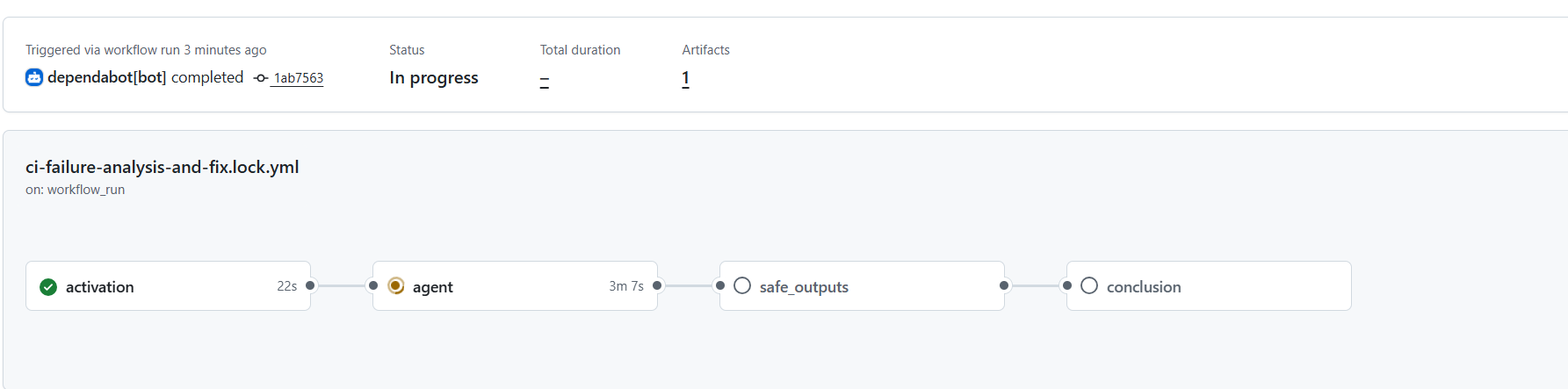
I’ve enabled Dependabot version updates and waited a few minutes for it to open a PR and if the CI failed, then the agentic workflow would kick in.

and kicked in it did:
Warning
By default the agentic workflow will set concurrency controls that are unique to the workflow to ensure no concurrent running of the same agent occurs.
This is the concurrency setting we got on our lock file (for the workflow, jobs might also have their own settings):
concurrency:
  group: "gh-aw-${{ github.workflow }}"
But this has the drawback that if the workflow is triggered multiple times in a short period some workflows will get cancelled.
So it would be wise to adjust the concurrency to avoid having cancelled workflows. See more on Custom Concurrency
It works: a green CI from an automated fix
When the agent finished running, I could observe on the job summary a PR has been created
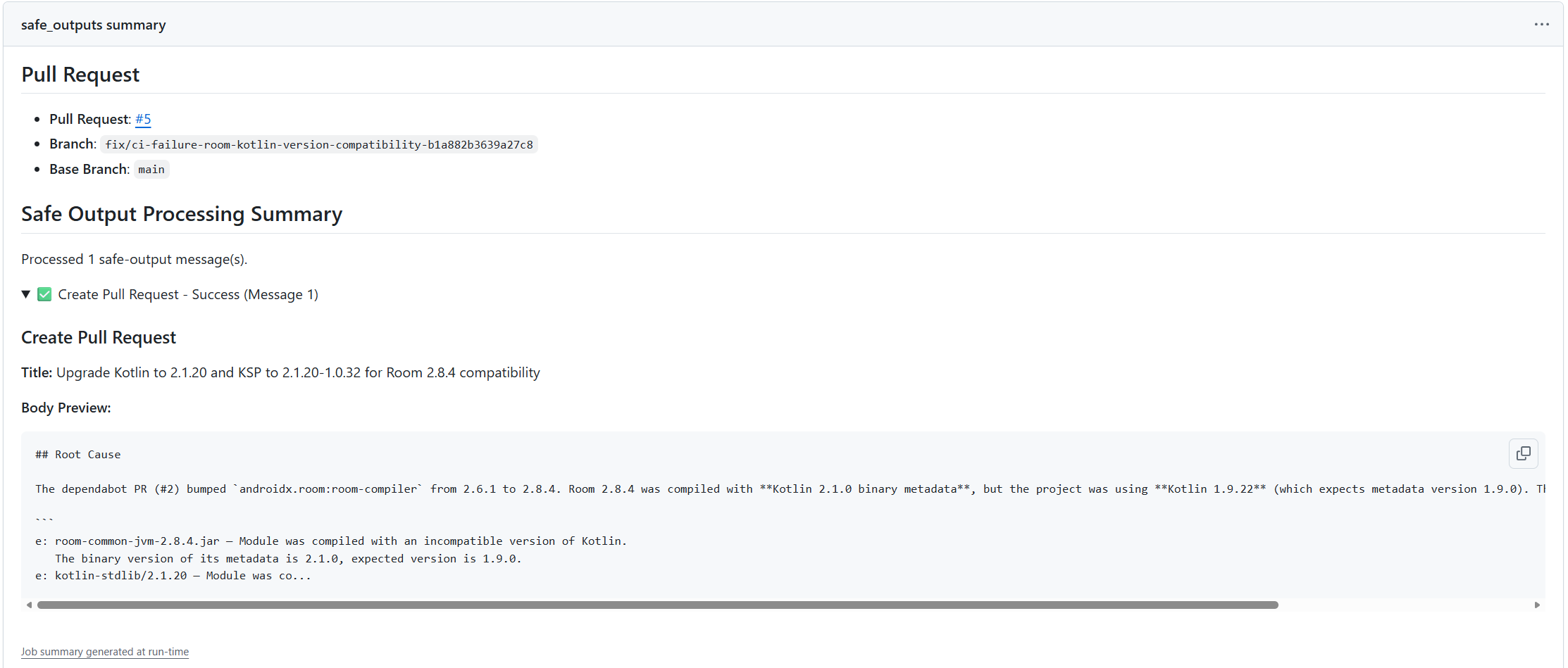
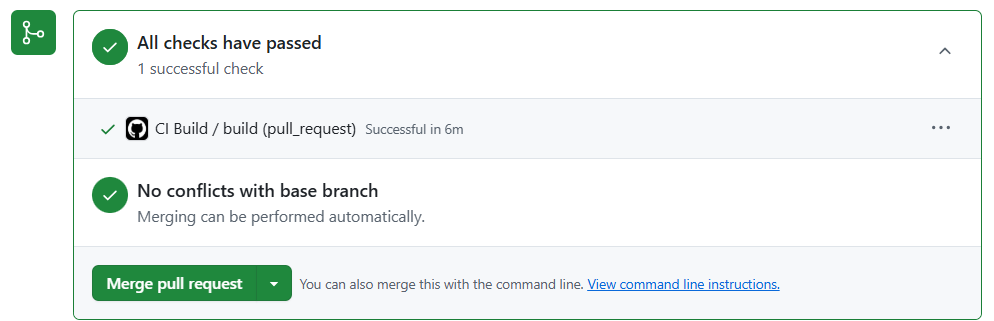
And even better, the PR contained the fix, with a clear description on the root cause of the problem as well as the fix (notice the PR creator identity, the GitHub app that was configured as the safe outputs identity).
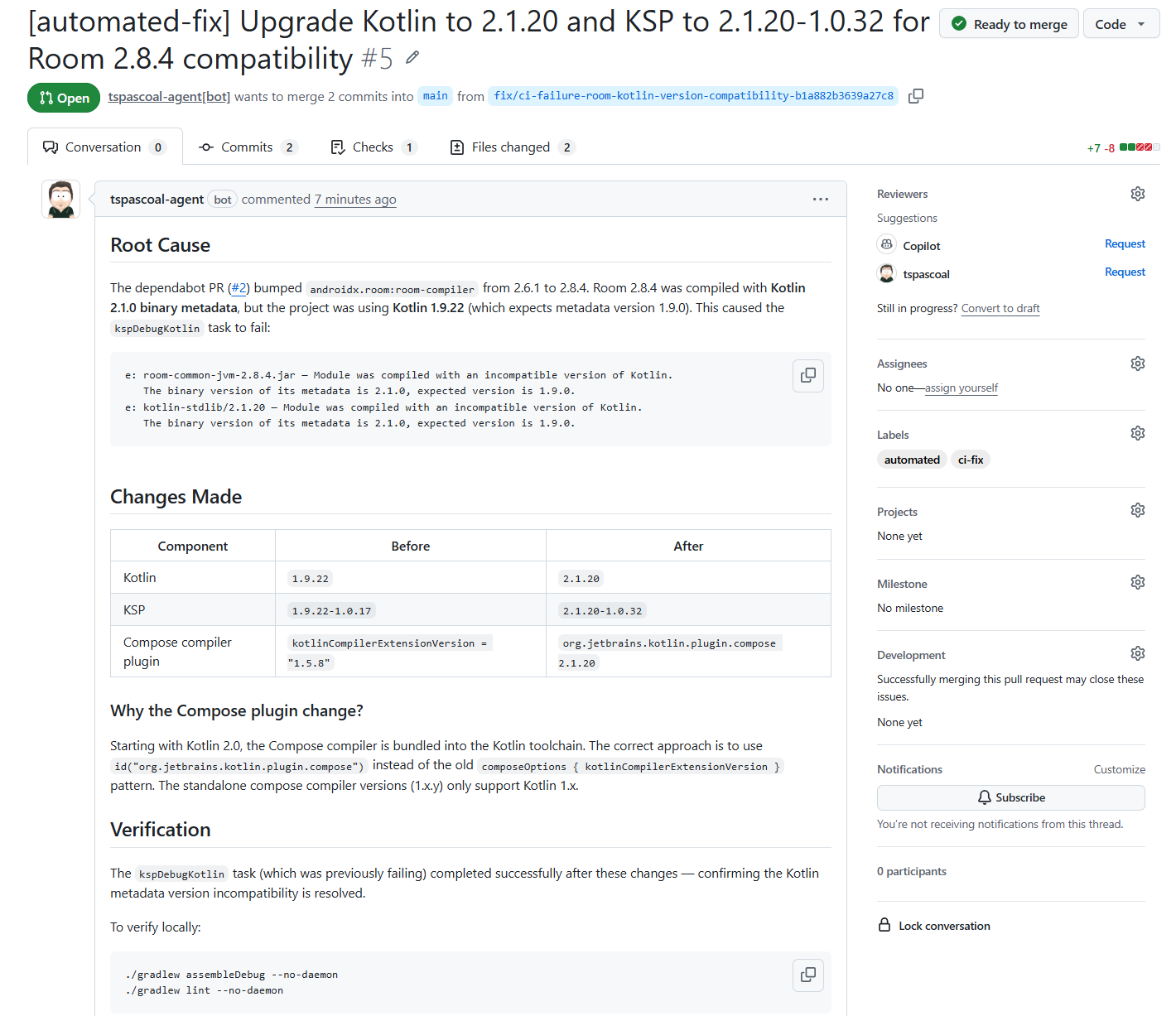
and the CI passes, we are ready to merge (once it’s merged, Dependabot will rebase its PR(s), notice that the update no longer makes sense, and close them).
Closing thoughts
What started as a personal Android app — built entirely by an AI agent, for an audience of one — turned into a small case study in how far you can push automation before a human needs to intervene. The answer, it turns out, is pretty far. The app was vibe-coded into existence by Copilot, the agentic workflow was authored by the coding agent from a single prompt, and the CI failures that followed were diagnosed and fixed autonomously. The only time I opened an IDE for this project was at the very end — I fired up IntelliJ once to run the app on an emulator and verify it actually worked before installing it on my phone. I never opened Android Studio, never read a Gradle migration guide, never manually resolved a dependency conflict. The entire lifecycle — from creation to maintenance — was handled by agents.
That’s the real takeaway here: agentic workflows aren’t just about automating one-off tasks — they’re about closing the loop. The traditional CI/CD pipeline is deterministic: it tells you what broke. An agentic workflow goes further — it figures out why it broke and fixes it. The shift from “alert me” to “fix it for me” is a meaningful one, especially for projects where the maintainer’s time is the scarcest resource.
Of course, this setup isn’t without its rough edges. The agent doesn’t always get the fix right on the first try, and some failures require domain knowledge that’s hard to encode in a natural-language prompt. But the fallback behavior — commenting on the PR with a root cause analysis, or opening an actionable issue — means that even when the agent can’t fix the problem, it still does useful triage work that saves time.
If I were to take this further…
There’s one obvious gap in this automation: the fix PRs still require a human to review and merge them. The agent creates the PR, CI passes, and then… it sits there, waiting for me to click the merge button. For a personal project with an audience of one, that’s still more friction than I’d like.
There are two paths forward. The simple one: instruct the CI-fix agent to enable auto-merge on the PRs it creates. If CI passes, the PR merges itself — no human, no extra workflow. This works well for straightforward fixes where you trust the build pipeline as a sufficient gate.
The more sophisticated option: a second agentic workflow — a vetting maestro — that reviews the automated fix PRs before merging. It would inspect the diff, sanity-check that the scope is limited to what’s expected, verify no unrelated files were modified, and only then approve and merge. This gives you human-like review without the human, and it composes naturally: Dependabot opens a PR, the CI-fix agent creates a fix PR when it fails, and the maestro validates and merges — agents all the way down.
For now, the single CI-fix agent already covers the most annoying part of the problem. The last mile is only a prompt away.